
Explore the latest trends and find our updates on all you need to know about what is happening in the world of web and technology.

 5397
5397
As a startup, one of the most important decisions you will make is choosing the right cloud solution to help you grow your business. The cloud has become an essential part of business infrastructure, providing startups with reliable, scalable, and cost-effective solutions for storing and processing data, and running applications. In this article, we will explore the benefits of choosing the right cloud solution, compare AWS, DigitalOcean, Google, and Microsoft Azure cloud solutions, and provide insights into how to choose the best cloud solution for your startup.
Choosing the right cloud solution can provide a range of benefits for startups. Cloud solutions offer scalability and flexibility, enabling businesses to scale their resources up or down as their needs change. This means startups can easily adapt to changes in demand without having to invest in expensive hardware or infrastructure. Cloud solutions also offer cost savings, as businesses only pay for the resources they use, and can avoid the high upfront costs of traditional IT infrastructure.
Another key benefit of cloud solutions is reliability. Cloud providers offer high levels of uptime, ensuring that startups can access their data and applications when they need them. Cloud solutions also offer data security and protection, with providers offering a range of security features to protect against data breaches and cyberattacks.
There are a range of cloud solutions available for startups, including AWS, DigitalOcean, Google, and Microsoft Azure. Each provider offers different features and pricing models, so it's important to understand the differences between them before making a decision.
AWS is one of the most popular cloud solutions, offering a range of services including compute, storage, and databases. AWS is known for its scalability and flexibility, making it a popular choice for startups. DigitalOcean, on the other hand, offers a simpler, more affordable solution for startups with lower traffic demands. Google Cloud offers a range of services and features, including machine learning and data analytics, while Microsoft Azure provides a range of options for hybrid cloud solutions.
Choosing the best cloud solution for your startup depends on a range of factors, including your budget, traffic demands, and the features you require. It's important to consider your business needs carefully before making a decision. Here are some key factors to consider when choosing a cloud solution:
One of the most important factors to consider when choosing a cloud solution is cost. Different providers offer different pricing models, so it's important to understand the costs involved before making a decision. Some providers offer pay-as-you-go pricing, while others offer fixed pricing plans. It's important to consider the long-term costs of each solution, including any potential hidden costs.
Scalability is another important factor to consider when choosing a cloud solution. Your business needs may change over time, so it's important to choose a solution that can scale with your business. Look for a provider that offers flexible scaling options, such as auto-scaling, which can automatically adjust resources based on demand.
Reliability is key when it comes to cloud solutions. Look for a provider that offers high levels of uptime and reliability, with robust backup and disaster recover track record y options. It's also important to consider the provider's track record when it comes to security and data protection.
Different cloud solutions offer different features, so it's important to consider which features are most important for your startup. For example, if you require machine learning or data analytics, you may want to choose a provider that offers these features as part of their solution.
DevOps plays a crucial role in cloud solutions, enabling startups to quickly and efficiently deploy and manage applications in the cloud. DevOps involves a range of practices and tools that enable teams to collaborate and automate processes, making it easier to manage infrastructure and applications. By implementing DevOps practices, startups can reduce the time and cost of deploying applications, and improve the reliability and scalability of their infrastructure.
To help you choose the best cloud solution for your startup, let's compare AWS, DigitalOcean, Google, and Microsoft Azure.
AWS offers a wide range of services and features, making it a popular choice for startups. It offers flexible pricing options, with pay-as-you-go pricing and reserved instances. AWS also offers a range of scaling options, including auto-scaling and load balancing.
DigitalOcean offers a simpler, more affordable solution for startups with lower traffic demands. It offers fixed pricing plans, with no hidden costs, and provides straightforward scaling options. However, DigitalOcean has limited features compared to other providers, and may not be suitable for more complex applications.
Google Cloud offers a range of features, including machine learning and data analytics. It offers flexible pricing options, including pay-as-you-go and committed-use discounts. Google Cloud also offers a range of scaling options, including auto-scaling and load balancing.
Microsoft Azure provides a range of options for hybrid cloud solutions, making it a popular choice for businesses with on-premises infrastructure. It offers flexible pricing options, with pay-as-you-go and reserved instances. Azure also offers a range of scaling options, including auto-scaling and load balancing.
For startups on a budget, DigitalOcean is a good choice, offering a simple, affordable solution with no hidden costs. Other options include AWS and Google Cloud, which offer pay-as-you-go pricing and flexible scaling options. It's important to consider the long-term costs of each solution, as well as any potential hidden costs.
For startups with high traffic demands, AWS and Google Cloud are good choices, offering flexible scaling options and high levels of reliability. It's important to consider the cost of each solution, as well as any potential downtime or performance issues.
There are a range of cloud solution services available for startups, including infrastructure as a service (IaaS), platform as a service (PaaS), and software as a service (SaaS). IaaS provides startups with the infrastructure they need to manage their applications and services, while PaaS provides a platform for building and deploying applications. SaaS provides ready-to-use software applications, such as email or CRM solutions.
Choosing the right cloud solution is crucial for startups, enabling them to scale their resources, reduce costs, and improve reliability. AWS, DigitalOcean, Google, and Microsoft Azure are all popular choices, with different features and pricing models. When choosing a cloud solution, it's important to consider your business needs carefully, and to choose a provider that offers the features and scalability you require. By implementing DevOps practices, startups can also improve the efficiency and reliability of their cloud infrastructure, helping them to grow and succeed in the long term.


 2450
2450
Cloud solutions have been transforming the way businesses operate, offering a myriad of benefits such as increased efficiency, cost savings, and flexibility. However, many small businesses are hesitant to adopt cloud solutions due to several misconceptions and myths. This article aims to debunk six of the most common myths surrounding cloud adoption to help small business owners make informed decisions and reap the rewards of this powerful technology.
Contrary to widespread belief, cloud solutions can be more cost-effective than traditional on-premises solutions. With cloud computing, businesses pay for the resources they use, making it a scalable option that grows with the company. This eliminates the need for upfront capital investments in hardware and software, as well as ongoing maintenance and upgrade costs.
Moreover, many cloud providers offer flexible pricing plans tailored to small businesses, ensuring that they only pay for the services they need. Eventually, the cost savings from reduced infrastructure and maintenance can help small businesses allocate resources to other aspects of their operations, fueling growth and innovation.
Security is a primary concern for any business, and many small business owners mistakenly believe that cloud solutions are less secure than on-premises options. However, reputable cloud providers invest heavily in security measures such as encryption, firewalls, and multi-factor authentication to protect their clients' data.
In fact, cloud providers often have more resources and expertise dedicated to security than small businesses can afford on their own. By choosing a trusted cloud provider, small businesses can benefit from robust security measures while still focusing on their core operations.
That being said, businesses should always be proactive in enhancing their security on the cloud, such as implementing strong password policies, regularly updating software, and educating employees on cybersecurity best practices.
While migrating to the cloud can seem like a daunting task, the process can be managed efficiently with the right planning and support. Many cloud providers offer migration tools and resources, and some even provide dedicated customer support to guide businesses through the process.
By breaking the migration down into manageable steps and working with a reliable cloud provider, small businesses can successfully transition to the cloud with minimal disruption to their operations. Numerous small businesses have already made the switch and are enjoying the benefits of cloud-based solutions.

Cloud solutions are often thought to be one-size-fits-all, but this is far from the truth. Most cloud providers offer a range of customization options and APIs, allowing businesses to tailor their cloud services to their specific needs.
Furthermore, cloud solutions are designed to integrate seamlessly with existing tools and software, enabling small businesses to leverage their current investments while enjoying the benefits of the cloud. With the right provider, small businesses can create a cloud environment that perfectly aligns with their operational requirements.
Some small business owners might think that advanced cloud features are only useful for large enterprises. However, features like data backup, disaster recovery, and remote access can be invaluable for small businesses as well.
Data backup and disaster recovery ensure that businesses can quickly recover from unexpected events, such as hardware failures or natural disasters, minimizing downtime and potential revenue loss. Remote access allows employees to work from anywhere, increasing productivity and collaboration.
By leveraging these advanced cloud features, small businesses can build a more resilient and agile infrastructure, positioning themselves for growth and success.
Many small businesses fear that moving to the cloud means giving up control over their data and operations. This misconception stems from the idea that cloud providers assume full control over their clients' data and processes. However, in reality, businesses retain ownership and control of their data while benefiting from the cloud provider's infrastructure and services.
To maintain control and visibility over data and operations in the cloud, small businesses should carefully select a reputable cloud provider that offers transparent service level agreements (SLAs) and clear data policies. Additionally, businesses should consider utilizing cloud management tools and monitoring solutions to keep track of their resources and ensure optimal performance.
By being proactive and engaging with their cloud provider, small businesses can maintain control while enjoying the benefits of cloud solutions.
The myths surrounding cloud solutions for small businesses can often create unnecessary roadblocks to adoption. By debunking these misconceptions, small business owners can make informed decisions about adopting cloud solutions and harness their potential for growth, efficiency, and flexibility.
Small businesses should not shy away from exploring cloud solutions, as they can provide a competitive edge in today's rapidly changing business landscape. With the right provider and a tailored approach, small businesses can leverage the power of the cloud to drive innovation and success.
For small businesses considering cloud adoption, there are numerous resources and support services available to help them make the best decision for their unique needs. By embracing the cloud, small businesses can unlock new opportunities and thrive in the digital age.
 3705
3705
Cloud computing has been rapidly gaining popularity as an effective tool for businesses of all sizes. It offers a range of benefits, including cost savings, improved scalability, and increased flexibility. Despite this, there are still many misconceptions about cloud computing that can prevent businesses from realizing its full potential. In this post, we'll explore five common misconceptions about cloud computing and clarify the realities of this powerful technology.
One of the most common misconceptions about cloud computing is that it is not secure. Many businesses worry that their data will be vulnerable to cyber-attacks, data breaches, and other security threats. However, this is not the reality of cloud computing. In fact, cloud providers often employ security measures that are more robust than those that are typically implemented in on-premises environments. Cloud providers are often able to use economies of scale to invest in cutting-edge security technologies and hire top talent to secure their services.
In addition, cloud computing providers often follow a shared responsibility model, in which the provider is responsible for the security of the cloud infrastructure, and the customer is responsible for securing the data and applications they use in the cloud. This shared responsibility model ensures that both parties have a vested interest in maintaining high levels of security.
Real-life examples of secure cloud computing usage include financial institutions, healthcare providers, and other organizations that deal with sensitive data. These organizations are often required to meet strict regulatory requirements, and they have found cloud computing to be a secure and reliable solution for their needs.
Another common misconception about cloud computing is that it is too expensive. Some businesses worry that the upfront costs of migrating to the cloud will outweigh the long-term savings. However, this is not the case. While there are certainly costs associated with migrating to the cloud, these are often outweighed by the long-term savings that cloud computing can provide.
One of the key benefits of cloud computing is its pay-as-you-go pricing model. This means that businesses only pay for the resources they use, which can help to keep costs low. Additionally, cloud computing can often help businesses to save money on IT costs, such as hardware purchases and maintenance, and reduce the need for in-house IT staff.
Examples of companies who have saved money by using cloud computing include Netflix, Airbnb, and Dropbox. These companies have found that cloud computing has allowed them to scale their operations quickly and efficiently while reducing costs.
Another common misconception about cloud computing is that it is not reliable. Some businesses worry that cloud services may experience downtime or other issues that could disrupt their operations. However, this is not the reality of cloud computing.
Cloud computing providers often have redundancy and failover mechanisms in place to ensure that their services remain available in the event of an outage or other issue. In addition, cloud providers often provide performance guarantees, such as uptime guarantees, that can help to ensure that their services remain reliable.
Real-life examples of cloud computing usage in mission-critical systems include airlines, financial institutions, and other organizations that cannot afford to experience downtime. These organizations have found that cloud computing provides a reliable and robust solution for their needs.
Another common misconception about cloud computing is that it is only for big companies. Some businesses worry that cloud computing may be too complex or too expensive for small and medium-sized businesses. However, this is not the case.
Cloud computing is highly scalable, which means that it can meet the needs of businesses of all sizes. In addition, cloud providers often offer cost-effective solutions for small and medium-sized businesses that allow them to benefit from the same technologies and capabilities as larger organizations. Additionally, cloud computing can help small and medium-sized businesses to level the playing field by providing them with access to cutting-edge technology and resources that were once only available to larger organizations.
Real-life examples of small and medium-sized businesses that have benefited from cloud computing include startups, family-owned businesses, and local businesses. These businesses have found that cloud computing has allowed them to compete with larger organizations while keeping costs low.
Another common misconception about cloud computing is that it is complex to use. Some businesses worry that they will need to invest significant time and resources in order to learn how to use cloud services effectively. However, this is not the case.
Cloud providers often offer user-friendly interfaces and tools that make it easy for businesses to manage their cloud services. Additionally, many cloud services can be integrated with existing applications and systems, which can help to simplify the process of migrating to the cloud.
Real-life examples of businesses that have found cloud computing to be easy to use include marketing agencies, consulting firms, and other service-based businesses. These businesses have found that cloud computing has allowed them to focus on their core competencies while leaving the management of IT infrastructure to the experts.
Cloud computing is a powerful technology that can provide businesses of all sizes with a range of benefits. However, there are still many misconceptions about cloud computing that can prevent businesses from realizing its full potential. By understanding the realities of cloud computing, businesses can make informed decisions about whether cloud services are right for their needs. If you're considering migrating to the cloud, be sure to consult with a trusted cloud services provider to learn more about how cloud computing can benefit your business.
 3387
3387
Cloud computing has become an increasingly popular technology for businesses of all sizes. It offers numerous benefits that can help small businesses grow, increase efficiency, and compete with larger organizations. In this blog, we'll explore the basics of cloud computing, the importance of cloud computing for small businesses, and the purpose of this blog.
Cloud computing refers to the delivery of computing services-including servers, storage, databases, networking, software, analytics, and intelligence-over the Internet ("the cloud") to offer faster innovation, flexible resources, and economies of scale. Simply put, it's a way for businesses to access and use technology without having to invest in and maintain expensive hardware and software infrastructure.
Small businesses often face challenges when it comes to technology and resources. They may not have the budget or manpower to maintain their own IT infrastructure, and they may not have access to the latest technology. Cloud computing can help small businesses overcome these challenges by providing them with access to advanced technology and resources at a lower cost.
With cloud computing, small businesses can store their data and applications on remote servers, allowing them to access this information from anywhere with an internet connection. This increased mobility and flexibility can help small businesses become more agile and respond to changing market conditions.
Cloud computing also offers small businesses the ability to collaborate and communicate more effectively. Employees can work together in real-time on shared documents, regardless of their location. This can help small businesses increase productivity and efficiency.
The purpose of this blog is to help small businesses understand the benefits of cloud computing and how to take advantage of it. We'll explore the different types of cloud computing services, the key benefits of cloud computing for small businesses, and how to choose the right cloud computing solution for your business. We'll also look at popular cloud computing solutions for small businesses and how to implement cloud computing in your organization.
By the end of this blog, small business owners and decision-makers should have a better understanding of cloud computing and how it can help their business grow and succeed.
Cloud computing refers to the delivery of computing services-including servers, storage, databases, networking, software, analytics, and intelligence-over the Internet ("the cloud") to offer faster innovation, flexible resources, and economies of scale. Simply put, it's a way for businesses to access and use technology without having to invest in and maintain expensive hardware and software infrastructure.
There are three main types of cloud computing services: Infrastructure as a Service (IaaS), Platform as a Service (PaaS), and Software as a Service (SaaS).
IaaS provides businesses with access to virtualized computing resources, including servers, storage, and networking. This allows businesses to scale their IT infrastructure up or down as needed.
PaaS provides a platform for businesses to develop, run, and manage their applications and services. This includes everything from the operating system to the database.
SaaS provides businesses with access to software applications over the Internet. This includes popular applications such as email, customer relationship management (CRM), and project management tools.
There are three main types of cloud computing services: Infrastructure as a Service (IaaS), Platform as a Service (PaaS), and Software as a Service (SaaS).
IaaS provides businesses with access to virtualized computing resources, including servers, storage, and networking. This allows businesses to scale their IT infrastructure up or down as needed. Examples of IaaS providers include Amazon Web Services (AWS), Microsoft Azure, and Google Cloud Platform.
PaaS provides a platform for businesses to develop, run, and manage their applications and services. This includes everything from the operating system to the database. Examples of PaaS providers include Salesforce and Microsoft Azure.
SaaS provides businesses with access to software applications over the Internet. This includes popular applications such as email, customer relationship management (CRM), and project management tools. Examples of SaaS providers include Microsoft 365 and Salesforce.
Cloud computing offers several key benefits for small businesses, including increased mobility and flexibility, improved collaboration and communication, enhanced data security and disaster recovery, and increased scalability and cost savings.

Cloud computing allows small businesses to store their data and applications on remote servers, making it accessible from anywhere with an internet connection. This increased mobility and flexibility can help small businesses become more agile and responsive to changing market conditions.
Cloud computing also offers small businesses the ability to collaborate and communicate more effectively. Employees can work together in real-time on shared documents, regardless of their location. This can help small businesses increase productivity and efficiency.
Cloud computing providers typically invest heavily in security and data protection. This can provide small businesses with peace of mind knowing that their data is secure and protected from potential disasters such as fires or natural disasters. Additionally, many cloud computing solutions offer automatic backups and disaster recovery options, ensuring that small businesses can quickly recover from any disruptions.
Cloud computing allows small businesses to scale their IT infrastructure up or down as needed, without having to make a large upfront investment. This can help small businesses save money on hardware and software costs, and provides them with the ability to quickly respond to changes in demand.
By leveraging cloud computing, small businesses can access advanced technology and capabilities that might otherwise be out of reach due to cost constraints. With cloud computing, small businesses only pay for the resources they actually use, helping them control costs and reduce waste. Additionally, cloud computing solutions are often more affordable than traditional on-premise solutions, as the cost of infrastructure and maintenance is shared across many users.
In summary, cloud computing offers numerous benefits for small businesses, including increased mobility and flexibility, improved collaboration and communication, enhanced data security and disaster recovery, and increased scalability and cost savings. By leveraging these benefits, small businesses can stay competitive and operate more efficiently, allowing them to focus on growth and success.
The first step in choosing the right cloud computing solution is to assess your business needs. Consider your current IT infrastructure, your goals for growth, and the type of applications and data that you need to manage. This will help you determine the type of cloud service that best fits your needs.
Once you have a clear understanding of your business needs, you can start considering the different types of cloud services available. As discussed earlier, there are three main types of cloud computing services: IaaS, PaaS, and SaaS. Decide which one of these services will meet your needs best.
Security and privacy are critical considerations when choosing a cloud computing solution. Make sure to evaluate the security and privacy policies of the vendor you are considering to your data will be protected. Consider factors such as encryption, access control, data backup and recovery, and disaster recovery. You should also inquire about the vendor's compliance with data privacy laws and regulations, such as GDPR.
Finally, it's important to evaluate the vendor's reputation. This includes their track record of delivering reliable and secure cloud computing services, as well as their level of customer support and satisfaction. Look for reviews from other customers and industry experts, and consider reaching out to the vendor to ask questions and get more information.
Microsoft Azure is a popular cloud computing solution for small businesses. It offers a wide range of services, including virtual machines, databases, and web applications, and provides a scalable, reliable, and secure platform for small businesses to run their applications and manage their data.
Amazon Web Services (AWS) is another popular cloud computing solution for small businesses. It offers a broad range of services, including compute, storage, databases, and analytics, and is known for its scalability and reliability. AWS also provides a secure platform for small businesses to manage their data and run their applications.
Google Cloud Platform (GCP) is a cloud computing solution that provides a range of services, including virtual machines, storage, databases, and machine learning. It is a popular choice for small businesses looking for a flexible, scalable, and secure platform to manage their data and run their applications.
Salesforce is a cloud-based customer relationship management (CRM) solution that is popular among small businesses. It provides a range of features, including lead and opportunity management, account management, and customer service, and helps small businesses manage their customer interactions and sales processes more effectively.
In conclusion, cloud computing offers numerous benefits for small businesses, including increased mobility and flexibility, improved collaboration and communication, enhanced data security and disaster recovery, and increased scalability and cost savings. By choosing the right cloud computing solution, small businesses can stay competitive, operate more efficiently, and focus on growth and success.
Implementing cloud computing in a small business requires careful planning and preparation. This includes determining the specific business needs and goals, evaluating available cloud computing solutions, and selecting the best solution for your business. It's also important to have a clear understanding of the costs involved, including any upfront costs, ongoing expenses, and potential savings.
Once you have planned and prepared for cloud computing, the next step is to migrate your existing applications and data to the cloud. This process can be complex and time-consuming, but with the right planning and preparation, it can be managed effectively. During the migration process, it's important to assess your existing IT infrastructure, determine which applications and data can be moved to the cloud, and ensure that all data is securely transferred and protected.
Once you have migrated to the cloud, it's important to provide training and support for your employees. This includes training on the new cloud computing platform, as well as support for any questions or issues that arise. A strong support system is critical for ensuring that your small business is able to fully leverage the benefits of cloud computing and achieve its goals.
Finally, ongoing management and optimization of your cloud computing solution is important to ensure its continued success. This includes monitoring performance, addressing any issues or concerns that arise, and making any necessary changes to the platform to meet your evolving business needs. Regularly reviewing your cloud computing solution can help ensure that it continues to provide the benefits you expect and support your ongoing success.
In conclusion, implementing cloud computing in a small business requires careful planning, preparation, and ongoing management. By following these steps and providing the right training and support, small businesses can effectively leverage the benefits of cloud computing and achieve their goals.
One of the biggest challenges of cloud computing for small businesses is security and privacy concerns. With sensitive data and applications stored in the cloud, it's important to ensure that they are protected from unauthorized access and theft. This includes evaluating the security and privacy policies of the cloud computing vendor, as well as implementing strong security measures such as encryption and multi-factor authentication.
Another challenge of cloud computing for small businesses is the dependence on internet connectivity. With applications and data stored in the cloud, it's important to have a reliable and fast internet connection to access them. If the internet connection is slow or unavailable, it can affect the ability of the small business to operate effectively and achieve its goals.
Cost is another challenge of cloud computing for small businesses. While cloud computing can provide cost savings in many areas, it's important to carefully evaluate the costs involved, including any upfront costs, ongoing expenses, and potential savings. Additionally, small businesses may also be at risk of vendor lock-in, where they are locked into a specific cloud computing solution and unable to switch to another vendor if their needs change.
Finally, data loss or theft is a risk of cloud computing for small businesses. With sensitive data stored in the cloud, it's important to ensure that it is protected from theft or loss. This includes having robust backup and disaster recovery procedures in place, as well as regular monitoring and auditing of the cloud computing solution to ensure that it is secure and data is protected.
In conclusion, while cloud computing can provide many benefits for small businesses, it also poses certain challenges and risks. By carefully evaluating the security and privacy policies of the vendor, ensuring a reliable internet connection, and protecting sensitive data, small businesses can effectively mitigate these challenges and achieve the benefits of cloud computing.
In this blog, we've discussed the many benefits of cloud computing for small businesses, including increased mobility and flexibility, improved collaboration and communication, enhanced data security and disaster recovery, and increased scalability and cost savings. Cloud computing offers small businesses the ability to operate more efficiently, effectively, and securely, regardless of size or budget.
The key points of this blog include understanding cloud computing, choosing the right cloud computing solution, popular cloud computing solutions for small businesses, implementing cloud computing in small businesses, and the challenges and risks of cloud computing for small businesses.
In conclusion, cloud computing offers many opportunities for small businesses to grow, compete, and succeed. It provides the ability to operate more efficiently and effectively, with the added benefits of increased mobility and flexibility, improved collaboration and communication, enhanced data security and disaster recovery, and increased scalability and cost savings.
If you're interested in learning more about cloud computing for small businesses, we encourage you to reach out to us for a free consultation. Our experts can help you evaluate your needs and find the best cloud computing solution for your small business. Contact us today to learn more!
 5196
5196
Cloud computing is the practice of using a network of remote servers hosted on the Internet to store, manage, and process data, rather than a local server or a personal computer. The cloud is made up of a network of data centers that are located around the world, with each data center providing computing resources such as storage, processing power, and software applications.
As cloud computing has become more popular, businesses of all sizes have seen the potential benefits it provides. It's cost-effective, scalable, and provides access to a wide range of software applications. But what are the main benefits of cloud computing? Let's take a look!
Second, cloud computing is
highly scalable. With cloud computing, businesses can easily add or
reduce services as needed, without having to purchase additional
hardware or software. This makes it much easier for businesses to grow
and scale their operations as needed.
The benefits of cloud computing are numerous and can be broken down into several categories. First, cloud computing is cost-effective. Because users only pay for the services they use, cloud computing eliminates the need to purchase and maintain hardware and software, which can be costly. In addition, cloud computing can reduce energy consumption and eliminate the need for on-site IT support.
Second, cloud computing is highly scalable. With cloud computing, businesses can easily add or reduce services as needed, without having to purchase additional hardware or software. This makes it much easier for businesses to grow and scale their operations as needed.
Third, cloud computing provides access to a wide range of software applications. These applications can be used to create websites, store and share files, and manage customer data. With cloud computing, businesses can take advantage of the most up-to-date software without having to purchase and install it on their own.
In addition to the cost savings and scalability of cloud computing, there are several other advantages. One of the most notable advantages is increased flexibility. With cloud computing, businesses can access their data and applications from anywhere in the world with an internet connection. This makes it easier for businesses to access their data when they need it, and also makes it easier to collaborate with remote employees.
Cloud computing also provides businesses with increased reliability. By leveraging the redundancy of multiple data centers, businesses can ensure that their data is always available and secure. In addition, cloud computing services are typically backed by service-level agreements, ensuring that businesses have access to their data when they need it.
Finally, cloud computing provides businesses with increased security. Cloud service providers are experts in security and are constantly updating their security measures. This ensures that businesses' data is secure, and that their applications are protected from malicious attacks.
Despite the many advantages of cloud computing, there are some potential drawbacks. One of the biggest drawbacks is the potential for data breaches. As more data is stored in the cloud, there is a greater risk of data being stolen or compromised.
Another potential disadvantage of cloud computing is the lack of control. By using a third-party provider, businesses are relying on them to keep their data secure and available. This can lead to issues if the provider is unreliable or if they experience an outage.
Finally, cloud computing can be more expensive than traditional on-site solutions. Depending on the services used, businesses can end up paying more for cloud computing than they would for an on-site solution.
Security is one of the most important considerations for any business using cloud computing. Fortunately, cloud service providers are experts in security and have implemented numerous measures to ensure the security of customers' data. Most cloud service providers use encryption, two-factor authentication, and other measures to keep data secure.
In addition, cloud service providers use a variety of physical security measures to protect their data centers. These measures include access control, video surveillance, and fire suppression systems. All of these measures ensure that data is kept safe and secure, and that customers' data is never at risk of being compromised.
Another important consideration for businesses using cloud computing is performance. Cloud service providers are experts in performance and have implemented numerous measures to ensure that customers' applications and services are always running at peak performance.
For example, many cloud service providers use a variety of caching and load balancing techniques to ensure that applications and services are always running at optimal performance. In addition, cloud service providers use a variety of monitoring and analytics tools to ensure that applications and services are always running as expected.
One of the biggest benefits of cloud computing is that it is cost-effective. In addition to eliminating the need to purchase and maintain hardware and software, cloud computing also eliminates the need for on-site IT support. This can significantly reduce operational costs for businesses.
In addition, cloud service providers typically offer a variety of pricing options, allowing businesses to pay for only the services they need. This makes it easy for businesses to scale up or down as needed, without having to worry about the cost.
Cloud computing is also highly flexible. With cloud computing, businesses can access their data and applications from anywhere in the world with an internet connection. This makes it easier for businesses to access their data when they need it, and also makes it easier to collaborate with remote employees.
In addition, cloud service providers typically offer a variety of tools and services that make it easy for businesses to manage their cloud-based services. These tools and services can be used to manage customer data, create websites, store and share files, and more.
Finally, cloud computing provides businesses with increased reliability. By leveraging the redundancy of multiple data centers, businesses can ensure that their data is always available and secure. In addition, cloud computing services are typically backed by service-level agreements, ensuring that businesses have access to their data when they need it.
Cloud computing is an ever-growing revolution in the IT industry, and it is redefining what it means to access data, applications, and other services online. From its cost-effectiveness to its flexibility and security, the benefits of cloud computing are numerous. So, if you're looking to unlock a world of possibilities, look no further than cloud computing!
If you're looking to learn more about the incredible benefits of cloud computing and how it could help your business, call us today for a free consultation. We'll be happy to answer any questions you may have and help you get started on your cloud computing journey!
 2555
2555
The innovative cloud data center infrastructure, with enterprise-wide cloud migration, is now an unquestionable identity as a backbone of today's and future's digitally-driven world.
A shift from the deployment of cloud tools to more holistic strategies centralized around increasing the abilities of remote and hybridized workforces has authenticated the viability of cloud technology as one of the futuristic trends.
And, why not?
From serving as a key medium to the delivery pipeline of just about every digital platform, including social media and streaming entertainment, and to the connected cars and autonomous Internet Of Things (IoT) infrastructure, the cloud computing infrastructure is outright essential.
With super-fast networks like 5G and Wi-Fi 6E to be implemented broadly in near future, there will be an explosion in the availability of super-fast streaming services from the cloud gaming platforms such as Google Stadia and Amazon Luna. Moreover, we may have in future cloud virtual and augmented reality (VR/AR) to transcend our imagination to the Matrix-level rendition.
These are innovations in the making that prove the power of Cloud, and also its viability from an investment point of over the course of 2022.
The thirst for cloud solutions is ever-growing, with more businesses around the world adopting cloud migration strategies.
As long as businesses worldwide adopt a cloud-first strategy, let's discuss some new and futuristic cloud computing trends for 2022.
A cloud computing execution model or Serverless computing is an innovative architecture for code execution. It eliminates hassles for developers in managing, provisioning, and maintaining servers when deploying code.
Based on the mechanism called functions-as-a-service, serverless computing is now a revered cloud standard among bigwigs of the cloud computing world based on its legit pay-as-you-go model helping brands pay just for the services used. The serverless architecture rules out any major capital investment when it comes to scaling an application invisibly, and helps eliminate the risk of back-end snags.
The serverless computing model has a pivotal role in fostering a unique user experience in the future.
Google CEO Sundar Pichai is all in favor of the viability of cloud computing, based on its role in the deliverance of AI services, calling it more profound than electricity or fire, considering how the architecture will influence society in the future.
The development and evolution of both cloud and AI are deeply interwoven.
Moreover, the role of Cloud datacenters is also invaluable in catering to the working mechanism of Machine Learning platforms that relies on the huge processing power and data bandwidth. The artificial intelligence that is becoming so ubiquitous around us, like in Google search and Instagram filters, actually resides in the Cloud.
Some of the strongest trends in AI known as "creative" algorithms will have a substantial role in Cloud computing. These trends are generative machine learning that will facilitate the creation of anything from art to synthetic data, and language modeling that will help facilitate enhanced accuracy of machines in understanding human languages.
Kubernetes (K8s) is defined as an open-source container orchestration platform that streamlines the automation of software deployment, scaling, and management.
The productivity of this platform has become so stronger within the span of five years that it is now functioning as a default method for deploying and managing cloud applications, notably faster progress than any enterprise technology.
Moreover, the technology's latent power is to map computer resources in sync with the requirements of services in the ongoing infrastructure paradigm.
Interestingly, Kubernetes is seen to be used in conjugation with the new infrastructure layer called blockchain or to deploy blockchain networks. Blockchain is an open-source technology of shared, tamper-proof ledger recording transactions among parties.
The use of Kubernetes for blockchain means interoperable services between companies having different architectures.
Moreover, the deployment of blockchain on Kubernetes is quite simplified, aside from the fact that it also affords the feature of great upgradeability. Such deployment is seen as the standard of adoption aiming to solve the issue of complexity and integration into the existing infrastructure of the blockchain.
A distributed information technology (IT) architecture, edge computing facilitates the processing of client data or involves building localized data centers for computation and data storage near the originating source.
Meaning, it rules out a central location positioned at thousands of miles away. Basically, the technology is an efficient alternative to computing and storing information in the cloud infrastructure.
A decentralized computing infrastructure like edge computing allows reducing latency issues and gives more power to application performance. Data processing is done locally, given its proximity to the end user's device. Therefore, the technology benefits organizations to save money.
The main difference between cloud computing and edge computing is that it uses the data that is time-sensitive while cloud computing processes data that is not time-driven.
Cloud gaming is a subscription-based emerging technology in which the users can stream a host of unlimited virtual games on their desktop, laptop, or smartphone. Interestingly, it rules out using an expensive console to play the choice of your cloud gaming.
The premise developed around cloud gaming is that a player doesn't have to buy a disc and console and can stream a game that works on remote servers in data centers.
No doubt, cloud gaming leverages cloud technology in the gaming industry to cater to the demand and engagement of countless players for unlimited options of games, thus eliminating the need for having storage space or specialized hardware. It also rules out the possibility of piracy problems.
The cloud-gaming is quite an emerging trend in the cloud computing environment in the future.
Hybrid cloud and multi-cloud both are used interchangeably but they have one major difference.
Hybrid cloud includes private cloud infrastructure and is typically managed as one entity. On the other hand, multi-clouds consist of more than one public cloud service. Both the infrastructures are the need of the time without any compromise between approaches.
For instance, public servers will be used to store data that needs quick and frequent access while private servers can be used to keep more sensitive data with monitored access. In 2022, more organizations around the globe will focus on utilizing the benefits of these models.
Cloud technology has emerged as one of the biggest tech winners, becoming a trendy tech with novelty and standard for flexibility, productivity, and cost-effectiveness. With the increasing importance of cloud-powered services in virtually all business sectors worldwide, we are sure that the technology of varied and dynamic architecture will have its ubiquitous presence in 2022 and beyond.
 2346
2346
The primary requirement for all organizations today should be to support digital enterprise. For businesses to compete in the new economy, they need to adopt a different building system. Modern technologies and architectures are pushing organizations to follow different platform styles as well.
Gartner's advice is to develop any new app designed in Java or another language as a cloud-native app and to create every new framework as a cloud-native software system. The reasoning is that when the company is ready to migrate to the cloud, the teams will be able to shift quickly into a cloud system.
Cloud-native is a design and operating approach that ultimately uses the advantages of the cloud computing model. The cloud has redefined the business environment in nearly all sectors by removing the reliance on capital resources and staff to operate an enterprise data center, replacing it with on-demand and pay-as-you-go computing power without limit.
Reduced spending on IT means lower entry barriers, with the competitive advantage being a feature of the pace teams that can carry new ideas to market. New realities are emerging in the areas of application architecture and health for this latest design and pace. Local Cloud Natives Casey West and Stuart Ingram and Casey West are going through the topics of Architecture and Protection and continuously Providing Security.
Murphy's Law is universal and consistent- if anything can go wrong, it will go the wrong - which is particularly true in heterogeneous distributed systems. Failures can take several types, from a total collapse of service to a single latent service that causes a catastrophic cascading failure for the users or even occasional service failures.
In this talk, let us explore how to create robust, highly accessible systems using circuit breaker and bulkhead design patterns that help provide service and consumer guarantees irrespective of QoS breakdowns in operation. See how telemetry analysis of service interactions, latency, and failures can provide useful early insights into problems before impacting the customers.

You will learn how Netflix, one of the most significant examples of a distributed system, applies such principles at scale and how you can adapt them to the big or small infrastructure.
What does keeping systems safe in the cloud mean? When software workloads are distributed across elastic clusters, the notions of what it means to be a secure shift are scaled automatically and changed rapidly. Let us look at why what and how of cloud applications;
Once it comes to delivering apps, early technology pioneers like FANG (Facebook, Amazon, Netflix & Google) have several common themes. They have invested in building capabilities that allow them to release new features regularly. They accomplished this rapid cadence of release while ensuring the safe and reliable operation of their applications, in turn enabling them to respond more effectively to the needs of their customers.
Going beyond ad-hoc automation and implementing cloud-native activities that offer such predictable capabilities have achieved this degree of agility. The four main principles of Cloud Native practices are DevOps, Continuous Delivery, Microservices, and Containers.
We all have the same common objective of making the production of software and the operations team more productive through automation.
These techniques have, however, only been successfully proved at the aforementioned software-driven companies at this stage. Smaller, more agile businesses are recognizing the benefit here as well.
Native Cloud Apps practices include four fundamental tenets.
Microservices are an architectural approach for developing applications as a collection of small, independent services running on their own and communicating over HTTP APIs.
DevOps is the partnership between the software developers and IT operations to automate the software delivery process and improvements in infrastructure.

Containers enable the virtualization of lightweight by dynamically separating a single server into one or more separate containers. Compared to standard Virtual Machines (VMs), boxes give efficiency and speed. Containers, along with the framework, can handle and transfer device dependencies. While in many cases, the OS and the cloud platform underlying it are abstracted.
Continuous delivery allows for the quick, reliable, and frequent release of applications with less risk.
Now, let's look at the cloud's numerous native stack building blocks that help achieve the goals mentioned above. We have grouped here tools and solutions according to the problem they solve. Let us start with the infrastructure layer at the edge, then the tools used to supply the infrastructure, after which we have the container runtime environment.
Provisioning: The provisioning layer consists of automation tools that assist in network provisioning, image management, and device deployment. Spinnaker, Terraform, and Cloud Creation provides workflows for network provision.
Infrastructure: At the very edge, we have the infrastructure layer that typically includes the cloud (AWS, GCP, Azure, Openstack, and VMware) for the computing, storage, network, and operating system.
Runtime: The Runtime provides the environment the application is running in. This consists of the container engines, where the application runs along with the storage and networking related. Containers and rkt are the Container Engines most commonly used. Flannel, OpenContrail provides containers with the requisite overlay networking to communicate with each other and with the outside world.
Application Description and Development: We can develop multi-language micro-services for applications -Python, spring / Java, Ruby, Node. Packer, Habitat, and Bitnami provide the framework with image storage that can run through any platform- container or otherwise.
Orchestration and Management: Tools such as Kubernetes, Docker Swarm, and Apache Mesos abstract the container management clusters that allow for easy scheduling and orchestration of containers across multiple hosts. Consul offers discovery software registries while AVI, Envoy offers proxy services, load balancer, etc.
 2750
2750
Container orchestration is the mechanism by which container-based microservice applications are controlled across multiple clusters. Inside organizations, this idea is becoming increasingly prevalent. A wide range of Container Orchestration tools has become essential for deploying microservice-based applications. What we need is a good container management system that is reliable.
Orchestration tools assist users in developing, testing, and deploying containerized applications. They orchestrate the entire life cycle of applications based on specifications given. There is currently a wide array of Container Orchestration Tools available. We are going to cover the best container clustering and orchestration software used by several companies in development.
Openshift is installed on top of Kubernetes. Redhat is there to maintain and keep the concept of Openshift. It is formed with an open-source and enterprise (openshift container platform) versions that facilitate the proper functioning of the tool. Along with the core features of Kubernetes, it provides container management and orchestration components an excellent service.
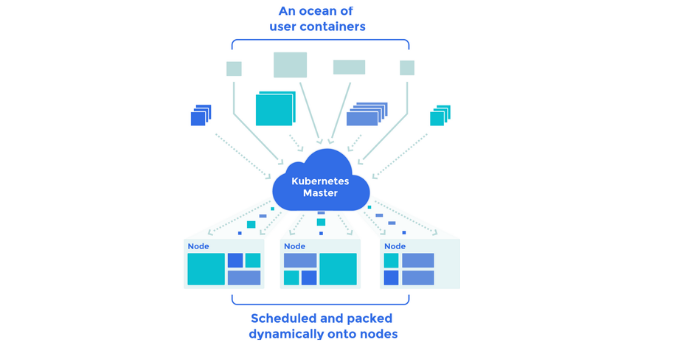
Google originally developed Kubernetes. It has since developed into a Cloud Native Computing Platform flagship project. It is an open-source, portable, orchestration framework that is managed by clusters. The Kubernetes architecture enables containerized systems to run several clusters to make accessibility and organization more efficient.

It is designed in a more effective and highly accessible manner with an excellent scheduler and resource manager to deploy containers. Kubernetes has been a de facto container orchestration tool for many organizations. Google manages the Kubernetes project with contributors from around the world. It offers many functions that are not provided by native docker tools. Additionally, Kubernetes are quick to get started.
Mesos is another cluster management tool that can efficiently manage the container orchestration. It was developed by Twitter and was then granted open sources. It was used by companies such as eBay, Airbnb, etc. Mesos is not an instrument devoted to the container; instead, you can use it for other than containers for VM or Physical Machine Clustering to run workloads (Big data, etc.). It has an effective framework for deploying and managing containers on a Mesos cluster, called Marathon. You can run a bunch of Kubernetes on a group of Mesos.
The Docker system is composed of tools from development to frameworks for the production deployment. The docker swarm in the list falls into cluster management. To manage a cluster of Docker containers, a mix of docker-compose, swarm, overlay network, and an excellent service discovery tool such as etcd, or consul, can be used.
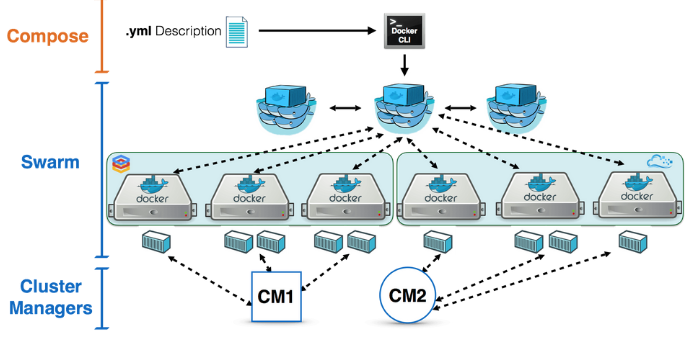
Compared with other open-source cluster management software, Docker swarm is also maturing in terms of functionalities. Considering the large contributors to the docker, it won't take that long for the docker swarm to get all the best features other resources get. Docker has a successful development plan recorded for the use of docker swarm in development.
A few managed cluster containers and orchestration services can be used to prevent complex cluster setups.
Amazon EKS is also another well-managed service from Kubernetes. It takes care of handling, protecting, and scaling containerized applications. Thus, the need for the Kubernetes control panel is annulled. These EKS clusters run in multiple zones in AWS Fargate, which calculates containers without a server. Applications based on Kubernetes can be conveniently migrated to Amazon EKS without codes. ECS is a service that AWS offers to manage the container cluster. ECS is not an agnostic cloud since it uses its proprietary cluster control and backend scheduling technologies. The only thing that can worry you is a lock-in from the vendor.
Openshift online is among the offers of Redhat's PaaS. Using this service, you can deploy applications to the cloud with openshift. You do not have to run the cluster since it is a pure PaaS operation.
Founded on Kubernetes, Google Container Engine serves as a management and orchestration (MANO) tool for Docker containers and container clusters running on the Google Cloud Platform. Google Container Engine made its debut in November 2014, using a web-based console and command-line tools to deploy and manage containers. It is fitted with a master node and an application system at Kubernetes. GKE is a container service that is operated on google cloud. GKE used Kubernetes at the backend. On GKE, you can use all the functionalities of Kubernetes.
Digital Ocean provides a managed Kubernetes service to deploy container-based apps. You can get $100 Digital Ocean credits for free.
EKS is an AWS operated cluster service supported by Kubernetes.
AKS provides a managed service with continuous integration and continuous delivery approach for the hosted Kubernetes. It facilitates convenient deployment and management of server fewer Kubernetes with more excellent reliability in security and governance.
AKS offers an agile framework for microservices. It allows for the more straightforward implementation and management of machine learning systems that are complex enough. Azure Kubernetes Service is Azure's highly available, managed, Kubernetes service.
The choice of a product or a service depends entirely on your needs and the nature of the task. There is no certainty in the fact that many companies use the tools mentioned above and services for their workloads in development.


 15 May
2023
15 May
2023 3
min read
3
min read